Change the MSS configuration#
With the introduction of support for multiple MSS configurations in the same builder, the MSS part was modularized to abstract away some of the intricacies to ease the price-of-admittance for people just getting started with PolarFire® architecture.
Quick recap#
As seen in Design & specifications, PolarFire® is split into two distinct parts:
Fabric: This is where you put your logic design.
MSS: This is the hard processor and peripherals.
This last part is the subject of today’s discussion.
MSS module#
We are leveraging two of git’s built-in features to compartmentalize the MSS as much as possible:
Bundle: Creates a nice and compact copy of the Repository for easy distribution.
Branches: Eliminates the need for a myriad of same-but-not-quite config files.
If you haven’t encountered git bundles before, please refer to it’s documentation.
Unrolling the bundle is as easy as:
git clone -b qspi sources/FPGA-design/mss.bundle [your-workdir-here]
where qspi signifies the particular variant you want to work on.
Note
You don’t need to specify a branch; git will check out the latest one if you don’t.
Navigate to the cloned directory and do a:
git log --all --decorate --oneline --graph
and you’ll see something like this:
* f3228ed (origin/default, origin/HEAD) Swap SPI_1 and QSPI connections
* ddf1142 Change MSS configuration
* d9f830d (HEAD -> qspi, origin/trunk, origin/qspi) Add ADAPTER abstraction layer
* b5bd77f Add DRAM subsys
* 521a2b6 Add base files
* 7152b35 Modularized MSS starting point
Notice how you’re parked at commit d9f830d.
Now you pick the branch that has the best starting-point for you and
git checkout -b [my-new-variant] [start-branch]
where start-branch is either qspi or default, depending on your requirements.
Tip
From here you can switch your builder to use the cloned Repository directly:
MSS:
    type: git
    local: your-workdir-here
    branch: my-new-variant
Just remember to commit your changes before running the builder; otherwise it won’t pick them up.
Looking at the graph above, commit ddf1142 and f3228ed is provided as an example
of what’s possible, but obviously only the sky is the limit.
Backannotation#
Once happy with your new variant, you can backannotate your Repository by:
git bundle create ~/builder/sources/FPGA-design/mss.bundle --all
and then undo the change you made to local in the build-options .yaml file.
Obviously, you do not want to change the branch value.
Version check#
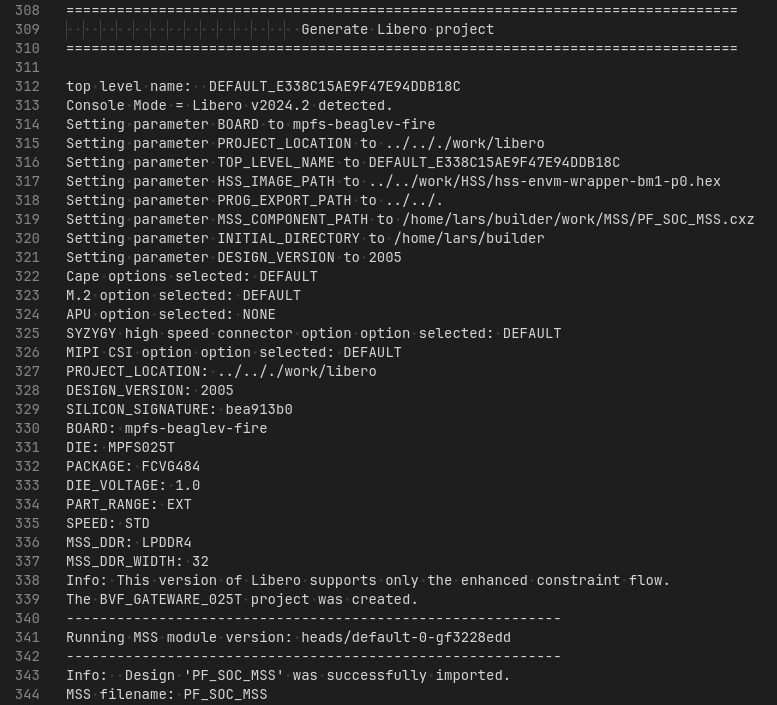
The running version can be seen at line 341 in the figure above.